Creating a CUBE Control
This section explains how control parameters are utilized to define and create a customer-driven CUBE Control.
Control Similarity
CUBE data relies on the network. A CUBE Control and its attributes, Risks, or Processes are included in a CUBE Index only if two or more customers operate a similar control. The similarity of customer controls is based on three elements:
- The control's overall intent/subject matter (e.g., user access restrictions)
- What the control is reviewing or monitoring (e.g., late bookings)
- What the control is looking for while reviewing or monitoring (e.g. suspicious activity).
If these elements are similar enough, a CUBE Control is created, including a CUBE Control Description, a CUBE Control Objective, determining Control Attributes, and mapping to Risk and Process.
Control Description
The first step in creating a CUBE Control is drafting the Control Description. The Control Description has three subsections: 'Review', 'Identify', and 'Action'. The following procedure is used to draft the Control Description:
- Similar customer controls are identified and reviewed together.
- The common element that is the 'Review' from these controls is extracted and drafted in CUBE DTS format. Customer-specific information is excluded (i.e., no system names, business names, specific report names, etc.), and the control wording is at a level that applies to all the grouped customer controls.
- The common 'Identify' elements are extracted from the customer controls. Customer-specific information is excluded (i.e., no system names, business names, specific report names). Bullet points from customer controls do not have to meet the 2 or more rule if the CUBE Subject Matter Expert determines that they articulate useful information pertinent to the control's core concept.
- The 'Action' section is defined using a defined list of actions that CUBE has identified as frequently articulated in customer data (as shown above).
Control Objective
The Control Objective explains how the control addresses the associated risks. Therefore, it can only be finalized after completing the risk mapping and determining the Control Type.
Risk Mapping and the Control Objective
Risk mapping is dependent on the grouping and alignment of customer controls with CUBE Controls. Before starting the risk mapping exercise, customer risks must be matched with CUBE risks at a firm level. It's important to note that Risk Matching is different from Risk Mapping. Risk Matching establishes the relationship of each customer risk to CUBE's Risk Taxonomy, while Risk Mapping connects CUBE Risks to CUBE Controls.
The following steps outline the risk mapping exercise:
- Match customer risks with CUBE risks at a firm level.
- Identify the customer controls matched with the new CUBE control.
- Identify the customer risks associated with those controls and their matching CUBE L3 Risk Event.
- Map the CUBE Risk Event to the new CUBE control, if it's matched with two or more customers.
- Partially complete the Control Objective.
- Finalize the Control Objective after identifying whether the Control Type attribute is Prevent or Detect.
Control Attributes
The Control Attributes are
- Control Name
- Control Owner
- Control Type
- Control Frequency
- Control Automation
- Control Theme
- Product (4 fields)
CUBE's network-driven approach, which follows the '2 or more rule', is used to determine the Control Type, Frequency, and Automation. Once these attributes are identified, the Control Description is reviewed to ensure it aligns with the Control Type, and if necessary, revised accordingly. The Control Objective cannot be completed until the Control Type is identified.
The appropriate Control Attribute value is selected from the defined list of values in the Appendix once the network-driven consensus of customer data is known.
It's important to note that:
- Control Name is free text but should be as concise as possible while still conveying the control's purpose and adhering to the naming convention formats (i.e., ending with 'Review' or 'Monitoring')
- Control Owner is also free text but has a preferred list of common owners
- Control Theme is free text but has a preferred list of common themes
- Product is not free text, and there is a set list of values to be used.
The '2 or more rule' -- The 'network driven' principle
CUBE's logic for including a control in the CUBE Index, as well as for Control Attributes, Risk mappings, and Process mappings, is based on whether the data point comes from two or more customers or not. If the data point comes from fewer than two customers, it will not be used within the CUBE Network. However, if two or more customers operate the same or a sufficiently similar control, attribute, risk, or process, it can be used within the CUBE Network.
### Specifically for Control Attributes:
- CUBE reviews each control against the customer controls matched with it.
- For Control Attributes with 1 or 0 customers providing data:
- Type and Frequency are reviewed by an SME who selects the most appropriate value until more customer information is available.
- Control Automation receives the value 'Insufficient Network Data' until more customer data is available.
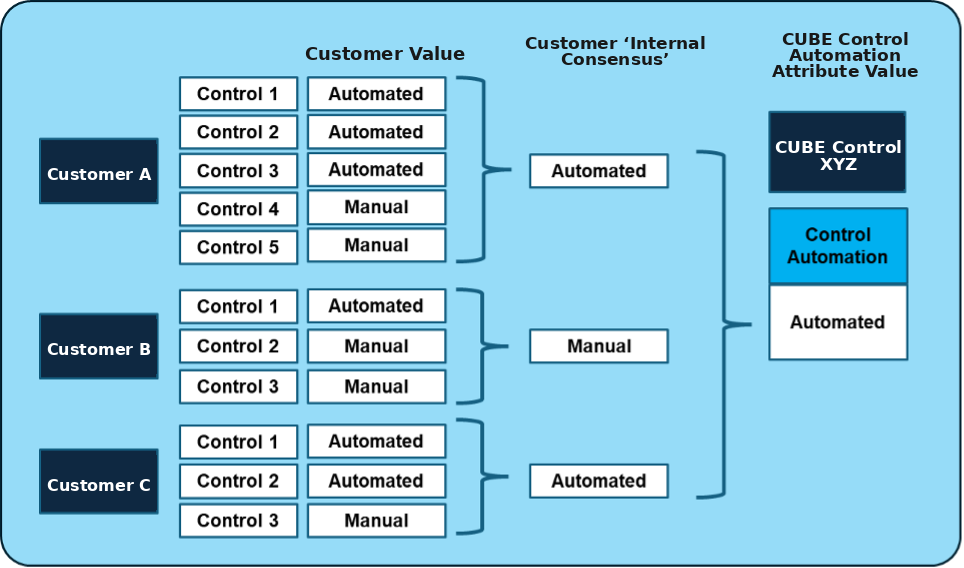
- If 2 or more customers provide data for a Control Attribute, CUBE calculates a network-driven consensus value.
The steps to calculate the CUBE Network value are as follows:
- To avoid skewed results from duplication or proliferation within a
customer's dataset, every customer can only contribute one value to the
attribute consensus calculation. This customer view, or 'internal
consensus' per customer, is determined by converting to the CUBE
equivalent value and selecting the most common of those values. For
example:
- If, for instance, Customer A has five controls matched to CUBE Control XYZ, with three of them being automated and two of them manual, Customer A's internal consensus for CUBE Control XYZ is 'automated'.
- In case of a tie:
- For Automation, CUBE selects the most automated value. For example, 'semi-manual' supersedes 'manual' where they are tied.
- For Frequency, CUBE selects the more frequent option.
- For Type, a CUBE SME reviews the matched customer controls to determine which is most appropriate.
- With each customer matched to the control now contributing only one
value to the calculation, CUBE uses the same logic to determine the
attributes value, i.e., it is determined using the most common value
across customers, for example:Â
- For Frequency, if Customers A, B and C have an internal consensus of 'Daily,' Customer D has an internal consensus of 'Weekly,' and Customer E has an internal consensus of 'Ad-hoc', then the consensus is 'Daily,' so CUBE tag Control XYZ with 'Daily'.
- Where there is a tie:
- For Automation - CUBE selects the most automated value, i.e., 'semi-manual' supersedes 'manual' where they are tied.
- For Frequency - CUBE selects the more frequent option
- For Type -- a CUBE SME reviews the customer controls to determine which is most appropriate
With each customer matched to the control only contributing one value to the calculation, CUBE uses the same logic to determine the attribute's value. For example:
- For Frequency, if Customers A, B, and C have an internal consensus of 'Daily', Customer D has an internal consensus of 'Weekly', and Customer E has an internal consensus of 'Ad-hoc', then the consensus is 'Daily'. Therefore, CUBE tags Control XYZ with 'Daily'.
- In case of a tie:
- For Automation, CUBE selects the most automated value. For instance, 'semi-manual' supersedes 'manual' where they are tied.
- For Frequency, CUBE selects the more frequent option.ßßß
- For Type, a CUBE SME reviews the customer controls to determine which is most appropriate.
As of May 2026, only Type and Frequency are considered in the matching and Insight Code selection activity.
An example of the application of the 2 or more rule is shown below: